1. What Is an LDF File in SQL Server?
SQL Server databases typically have two main file types:
- MDF: Primary database data file containing database objects and data pages.
- LDF: Transaction log file containing information about database transactions and modifications.
A database can have additional data files and multiple transaction log files, although multiple log files do not provide the same performance benefits as multiple data files. The transaction log is essential for database recovery and transaction consistency. SQL Server records changes in the transaction log before the corresponding modified data pages are written to disk. This process is part of the write-ahead logging mechanism.
Transaction log records may include information associated with:
- INSERT operations
- UPDATE operations
- DELETE operations
- Transaction begin and commit activity
- Database page and allocation changes
- Certain schema modifications
Not every log record directly represents a user-issued SQL statement. Many records describe internal storage-engine operations.
2. Why Would a DBA Need to Read an LDF File?
Transaction log analysis can be useful in several situations.
Investigating deleted records
A user reports that important records disappeared from a table. The DBA wants to identify relevant DELETE operations and investigate the affected records.
Investigating unexpected UPDATE operations
An application unexpectedly changes customer or financial information. The DBA needs to understand which values were modified.
Reviewing transaction activity
A database experiences unexpected changes, and the DBA wants to examine transactions associated with the incident.
Investigating schema modifications
A table was altered, truncated, or dropped. Available log records may provide evidence of certain schema-related operations.
Preparing recovery scripts
When sufficient log information is available, a DBA may be able to reconstruct supported modifications and prepare recovery SQL for review. These investigations depend on the availability and interpretation of relevant transaction log information.
3. Can You Open an LDF File Directly?
An LDF file is not a human-readable document. Opening it in Notepad, Excel, or a standard text editor will not produce a meaningful list of SQL statements. It is a structured binary file maintained by the SQL Server storage engine.
An LDF file also cannot simply be attached to an arbitrary SQL Server database as an independent source of transaction history. SQL Server requires valid database and log-file relationships, and ordinary attach operations have specific requirements.
For forensic investigation, avoid modifying original evidence files. Work with authorized copies and use a supported analysis workflow where possible.
4. How to Read SQL Server Transaction Logs Using fn_dblog
SQL Server includes an undocumented internal function called fn_dblog. DBAs sometimes use it to inspect transaction log records currently present in the database's transaction log file. For example, in a controlled test database:
USE YourTestDatabase;
GO

SELECT TOP (100)
    [Current LSN],
    [Operation],
    [Context],
    [Transaction ID],
    [AllocUnitName]
FROM sys.fn_dblog(NULL, NULL);
GOfn_dblog is an undocumented internal function. Access may require elevated database permissions. Run experiments only in a controlled test environment, and do not rely on this function as a supported production interface.
This query requests up to 100 available log records. The results may include operations such as:
LOP_BEGIN_XACTLOP_COMMIT_XACTLOP_INSERT_ROWSLOP_DELETE_ROWSLOP_MODIFY_ROW
However, interpreting these operations requires care. For example, LOP_DELETE_ROWS does not always mean a user executed a DELETE statement. Internal storage-engine activity can also produce row deletion log records.
Limitations of fn_dblog
Although useful for investigation, fn_dblog has several limitations:
- It is undocumented and unsupported as a public SQL Server API.
- Its output can be difficult to interpret.
- Internal operations can be mixed with user modifications.
- Relevant records may no longer exist in the active log.
- Reconstructing old and new column values can require decoding binary log data.
- Its behavior and output may vary across SQL Server versions.
For these reasons, manual transaction log analysis can be time-consuming.
5. What About fn_dump_dblog?
SQL Server also has an undocumented internal function called fn_dump_dblog. It is sometimes used to investigate transaction log backup information. Unlike fn_dblog, which reads available records from an active database log, fn_dump_dblog can be used internally to inspect supported log backup data.
However, it has significant limitations:
- It is undocumented.
- It is not a supported public API.
- Its arguments are complex.
- Its output requires detailed interpretation.
- Its behavior may change between SQL Server versions.
It should not be treated as a stable application programming interface. For supported recovery operations, Microsoft's documented BACKUP and RESTORE functionality remains the standard approach.
6. How to Read LDF Files Using DBLense Log Reader
DBLense Log Reader provides a graphical interface designed to simplify SQL Server transaction log investigation. Instead of manually examining raw log records, DBAs can use filters, transaction views, and grid-based analysis. The application supports online database transaction logs and selected offline log and backup sources.
Step 1: Select the transaction log source
Open DBLense Log Reader and choose the appropriate source. Depending on the supported configuration, available sources include:
- Online SQL Server database
- Standalone
.ldffile - Full database backup
.bakfile - Transaction log backup
.trnfile
Select the source you want to investigate and load the available log records.

Step 2: View transaction log entries
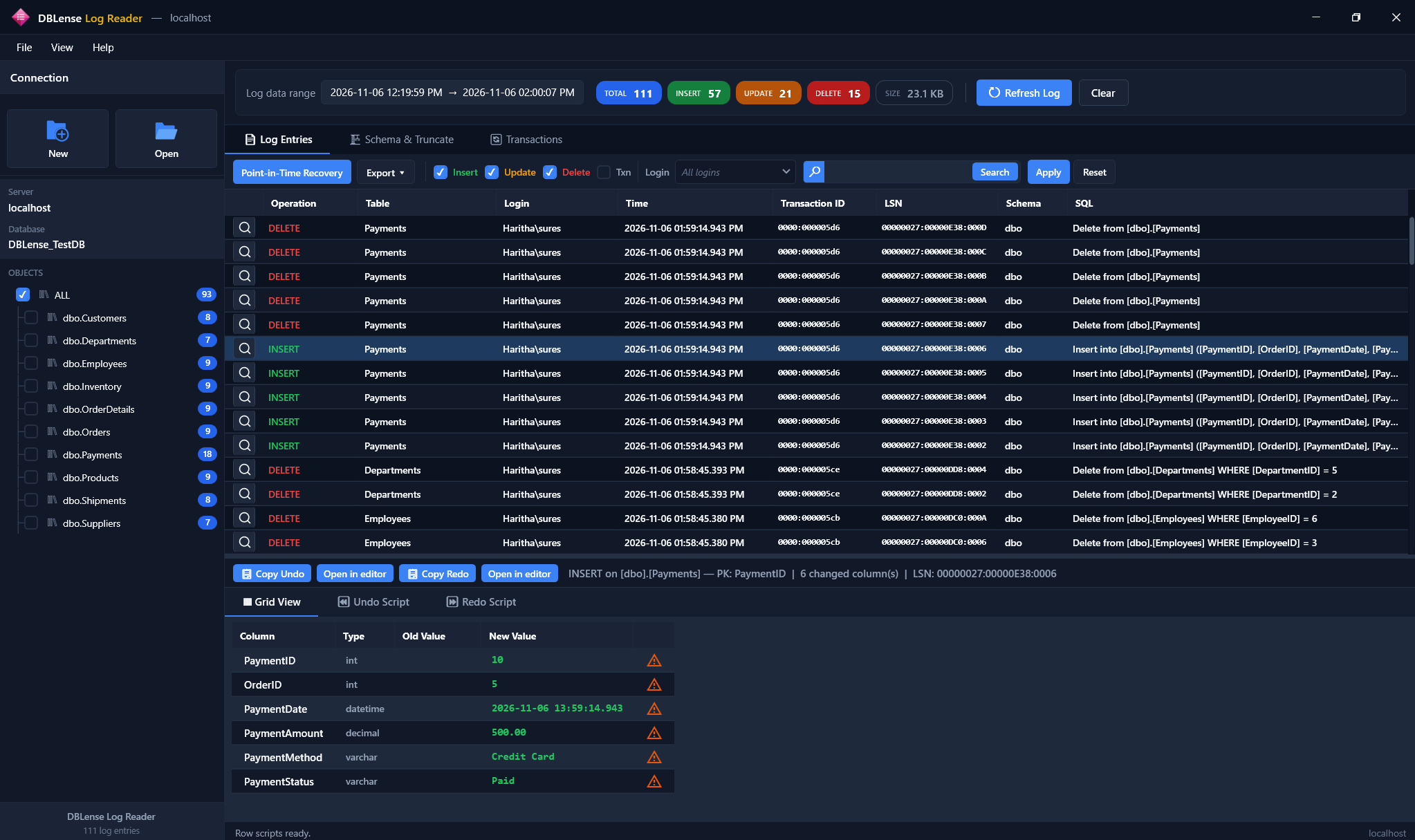
Open the Log Entries view. The application presents available transaction log activity in a simplified grid. Depending on the operation and available metadata, you can review information such as:
- Operation type
- Transaction ID
- Log Sequence Number
- Timestamp
- Database object
- Login information
This makes it easier to investigate relevant database activity without manually decoding every raw log record.
Step 3: Filter INSERT, UPDATE and DELETE operations
Use the available filters to narrow the results. For example, you can filter by:
- Operation type
- Table name
- Time range
- Transaction ID
- Login
- Text search
Filtering helps focus an investigation on relevant database changes.
Step 4: Inspect old and new values
For supported DML operations, use Grid View to inspect available old and new column values. This can help identify which records were inserted, updated, or deleted. The availability of reconstructed values depends on the operation, database structures, and available log records.
Step 5: Analyze transactions
Use the Transactions view to group related activity. Review available transaction information and investigate patterns such as unusually large modifications or long-running transactions.
Step 6: Generate Undo and Redo scripts
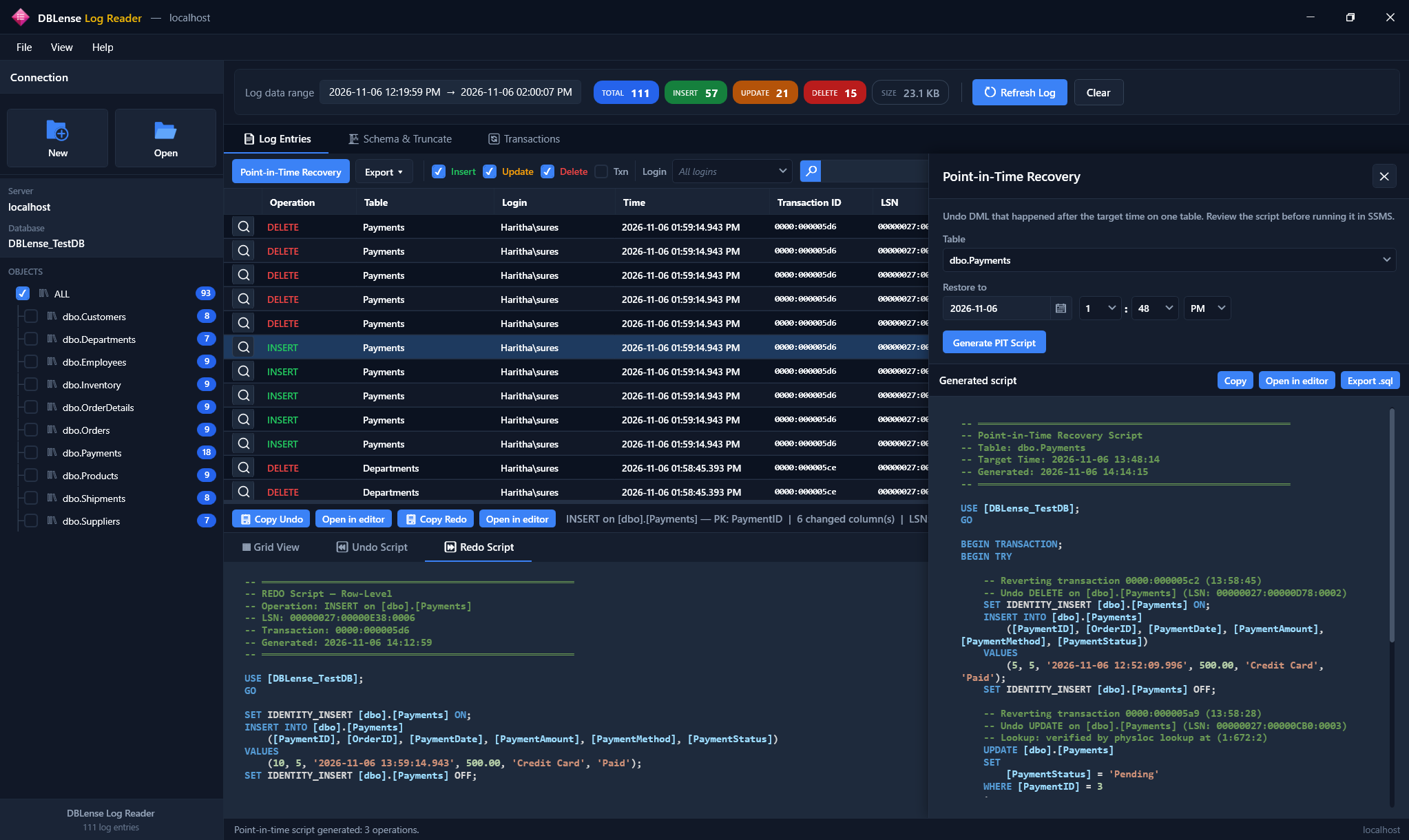
For supported operations, DBLense Log Reader can generate T-SQL scripts to reverse or replay changes. Always inspect generated SQL carefully before executing it. Validate the scripts in a safe environment and confirm that executing them will not overwrite legitimate subsequent changes.
DBLense Log Reader generates scripts for review; it does not automatically execute them.
7. Can You Recover Deleted Records from an LDF File?
Recovery may be possible when the necessary transaction log information is available. However, an LDF file does not guarantee that every deleted row can be reconstructed. Recovery depends on factors including:
- Whether the relevant log records are still available.
- Whether the operation is supported by the analysis tool.
- Whether sufficient row information can be reconstructed.
- Database structure and data types.
- Subsequent database activity.
- Available backups and recovery options.
For critical production incidents, preserve the available evidence and consider restoring backups to a separate environment before attempting recovery. For a focused DELETE investigation workflow, see How to Find Who Deleted a Record in SQL Server.
8. Difference Between LDF Files and Transaction Log Backups
An LDF file and a transaction log backup are not the same thing.
| LDF File | Transaction Log Backup |
|---|---|
| Active database transaction log file | Backup containing a range of transaction log records |
| Maintained by SQL Server | Created using BACKUP LOG |
| Used during normal database operation and recovery | Used as part of a database restore sequence |
| Contains log records currently retained in the file | Preserves log information included in the backup |
| Not a substitute for regular backups | Supports recovery when an appropriate backup chain exists |
For databases using the Full recovery model, regular transaction log backups are an important part of the recovery strategy. Do not rely on the active LDF file alone for historical investigation or disaster recovery.
9. Best Practices for SQL Server Transaction Log Investigation
When investigating an incident, follow these practices.
Preserve evidence
Avoid unnecessary database changes while collecting incident information. If appropriate, preserve relevant backups and diagnostic records.
Investigate the smallest useful time range
Use application reports, monitoring data, and available timestamps to narrow the investigation.
Distinguish user operations from internal operations
Not every low-level transaction log record corresponds to a user-issued INSERT, UPDATE, or DELETE statement.
Review login attribution carefully
A SQL Server login may represent an application connection or service account rather than an individual end user.
Validate recovery scripts
Review generated SQL and test it in a non-production environment before executing it against production.
Maintain a backup strategy
Transaction log analysis tools complement SQL Server backup and restore procedures. They do not replace them.
10. Conclusion
SQL Server LDF files contain valuable transaction log information that can help DBAs investigate database modifications and recovery scenarios. However, transaction log files are binary structures, and manually interpreting their contents through undocumented functions can be difficult.
DBLense Log Reader simplifies supported transaction log investigations through a graphical interface, filtering, transaction analysis, old/new value inspection, and Undo/Redo script generation. Whether you're investigating deleted records, unexpected updates, or database transaction activity, a structured log analysis workflow can help you understand what happened.
Analyze SQL Server Transaction Logs with DBLense Log Reader
Investigate supported online and offline transaction log sources with filtering, grid analysis, and reviewable recovery scripts.
Frequently Asked Questions
Can I read an LDF file without SQL Server?
An LDF file cannot be meaningfully read using an ordinary text editor. Specialized analysis software may support selected standalone LDF files, subject to compatibility and file requirements.
Is fn_dblog supported by Microsoft?
No. fn_dblog is an undocumented internal SQL Server function and is not a supported public API.
Can I see DELETE statements in an LDF file?
Transaction logs can contain records associated with DELETE operations. However, a log record does not necessarily preserve the original SQL statement text.
Can I recover deleted rows from a transaction log?
Sometimes. Recovery depends on available log records, supported operations, and whether sufficient data can be reconstructed.
Can I read SQL Server transaction log backup files?
Transaction log backups can be used in supported SQL Server restore workflows. Specialized tools, including DBLense Log Reader for supported sources, can also help analyze log backup information.
Is DBLense Log Reader a replacement for SQL Server backups?
No. It is a transaction log investigation and recovery-script generation tool. Regular SQL Server backups remain essential.
References
Microsoft Learn:
- The Transaction Log (SQL Server)
- Transaction Log Architecture and Management Guide
- Recovery Models (SQL Server)
- Transaction Log Backups (SQL Server)
← All articles · Related: TRN log backups · Related: Find who deleted a record · Log Reader docs